Showing posts with label Reviews. Show all posts

Friday, August 12, 2011

August 12, 2011

Build Social Networking Site like Orkut � Dolphin Review


Build Social Networking Site like Orkut � Dolphin Review


Orkut is pretty big atleast in India because of the Interface and the looks and everything which is why i have seen that the Generation Y still does not want to move to either Twitter or Facebook and still stick to Orkut. Well on the same thoughts i thought of building a new Community for Patels � which is our community where people all over the world can join and stay connected. Along with this in the long run we can even set up matrimonial options, payments for premium members and also charge the members to get access to others private details for the matrimony system. The search for a good script didnt take much time because the one which i found was called as Dolphin offered by Boonex.


The script is so powerful that it offers a single package for creating your own Social Network, Web Community, Dating Site, Matrimonial Website which comes with options like Friends, Chat, Messenger, Video, Music, Groups, Communities, Classifieds, Events, Polls, Photo Gallery and lot more. Iam sure it would be very much excited to see how the final site looks like because getting all the before mentioned features through a single script for free of cost looks not to be real but you can check out my new community at Patels Online which is built on Dolphin Script powered by Boonex, with only one limitation which is that Boonex would have links to their website from the footer and you need to make a payment to remove this.


Boonex Admin Panel


The script is around 30mb in size which you need to download and upload to your ftp host, following which the installation procedure will begin. Next you will be asked to install some modules on your server because the script handles Thumbnail Generation, Video & Music Uploads. Once the script is installed you need to register for a Boonex.com free account which would unlock most of the features in your script. The backend looks excellent as shown below which is the Admin Access Section.


The Builder option in Admin Panel is one of the best feature which allows you to Drag & Drop Items in order to make them Active or Deactivate them. Check out the following screenshot which can show you how easy it is to configure the top navigation bar and also individual pages like the Homepage or the Contact Page. The script is heavily customizable which allows you to easily create categories for the Groups and also you can edit the Email Templates sent to your members. There are some features like Hot or Not and Rate the Pictures which can make sure that your Community Members wont be leaving your site soon and would enjoy leaving feedback and ratings for others.


Boonex Menu Builder


The Payment Module is powered with Paypal, CCBill, 2CheckOut & Authorize.Net under which you need to just Enter your Account Details and funds would be transferred to the respective accounts when someone pays to become a premium member. One of the best part i like about this script is that its totally Search Engine Friendly with nice Permalinks for all the pages which are generated ie Member Pages, Articles, News, Galleries, Groups etc.

Sunday, June 13, 2010

June 13, 2010

Dungeon Twister

All the might of your group of adventurers is not enough! Your courageous characters have been captured and summarily thrown into the fortress of a rich and powerful wizard. He is a cruel and vicious man who is bored to death and keeps himself occupied by watching his prisoners skillfully navigate the traps of his infernal mechanical labyrinth.

And since we all now the old saying, No pain, no gain, there isn�t just one but two groups of enemy adventurers in the sinister dungeon! Two groups that will come face to face and must fight in hand to hand combat in order to return to the surface and once again taste freedom!

Take control of eight characters with different magical powers : warrior, troll, thief, priest, wizard� and head straight towards the dungeon�s exit!

The mission isn�t going to be easy and not only must you contend with fighting your opponents, the ground upon which you find yourself is unstable. The rooms turn and reveal new pathways, doors close and the beautiful route to victory that you just found is now a minefield of traps!

So, to play and win this game, you must choose your weapons : speed, trickery or strength and above all, give it everything you�ve got and use your powers of strategy!

click here to download Dungeon Twister free full version

Tuesday, May 25, 2010

May 25, 2010

Review of latest Spice S7000 Touchscreen Phone

Spice Mobiles has launched its latest touchscreen phone, the S7000 in India - complete with an array of features that include a 3.2 inch WQVGA screen, a 3.2 megapixel camera and unlimited phone book entries.


The launch of this phone comes just a few months after the company launched its 12 megapixel camera phone in India, the S-1200. 

As for the S7000, it comes with 19MB of internal memory which can be expanded up to 16GB with the help of a T-Flash memory card. The phone is capable of video recording at 15fps - although the resolution of the recording hasn't been specified. 

Also, the camera doesn't have a flash. On the good side of things, the phone supports an array of video formats that includes RMVB, FLV, WMV, AVI, MP4, 3GP, MOV, DAT and RM. It supports 720P videos as well. 

Other features include Zi predictive text, 1000 SMS memory, email facility, JAVA, incoming call guard, FM radio, Bluetooth v2.0. The phone can be used as a webcam as well. The phone is also social networking ready and comes preinstalled with Yahoo, Wapedia, VuClip, Facebook, Nimbuzz, Reuters, Ibibo, OperaMini and Snaptu applications.


It has an 880 mAh battery that provides up to 220 hrs standby and up to 3.5 hrs talk time. As of now, the phone is available only in white color. As for the price, this will set you back by Rs. 7,499. 

Spice has also announced that it is partnering with Disney for mobile content for this handset. This means that the S7000 will come loaded with Disney content as well. As of now, the phone will come with exclusive content of Prince of Persia- Sands of Time, the latest Disney movie. The content includes themes, wallpapers and ringtones.

Sunday, April 4, 2010

April 04, 2010

The 10 most surprising things about the iPad

The UPS guy handed me my new iPad just a few hours ago, and yes--the jumbo-sized screen is as glorious as they say, and I was shocked by how good HD videos looked. But I was also surprised by how heavy the iPad feels, and if you were hoping to read e-books all day under the clear, bright blue sky, well...bad news, folks. These and more iPad surprises, coming right up.


1. It screams
The early reviews all said that the iPad was "wicked fast," and boy, they weren't kidding. Applications literally fly open, and browsing the Web on Safari is way faster than on the iPhone. I could get used to this.

2. It's heavier than I thought it would be 

One-and-a-half pounds sounds pretty light, especially when you consider that the flyweight MacBook Air weighs in at about 3.5 pounds. That said, the iPad felt surprisingly heavy the first time I hefted it�not so heavy that I'm bursting a blood vessel or anything, but I'm curious to see how it'll feel after an hour or so of reading an iBook, what Apple is calling the e-books you can download onto the device.

3. Good luck reading e-books in direct sunlight
Yes, the iPad has it all over the Kindle when it comes to its eye-catching color screen and sleek page-flicking animations. The beauty of the Kindle's black-and-white e-ink screen, however, is that text stands out quite nicely when you're reading in the sun; on the iPad, however, the color display looks disappointingly washed out in direct sunlight, problematic for reading e-books poolside.

4. Virtual QWERTY keypad isn't as bad as I'd feared

No, it's nothing like typing on a real keyboard, but for me, the iPad's virtual QWERTY keypad isn't nearly as terrible as many had warned. I've managed to bang out a few decent-sized emails on the thing, and it's certainly better than typing on the iPhone. The key, I've found, is to relax and let the automatic error correction do its thing; if you keep hitting backspace to fix your errors (and there will be errors, trust me), you'll be tapping all day. That said, keep in mind that to type on the iPad, you must do one of several things:
Prop it (awkwardly) in your lap to type
Place it flat on a table�not the best solution due to the iPad's curved back
Hold it in one hand and tap with the other, effectively slashing your possible WPM
Invest in Apple's $79 iPad keyboard dock
Use Apple's $39 case to prop the iPad up at a good typing angle
5. Can't charge iPad over a USB port
First I tried it on my USB hub, then on the powered USB port on my MacBook Pro, but nope...no juice�not even when the iPad's syncing with iTunes. Looks like the only way to charge the iPad, apparently, is using the included AC wall adapter. Good thing the iPad's battery is rated for 10-plus hours.

6. HD videos look amazing
Practically the first thing I did after unpacking the iPad was queue up the 720p trailer for "Avatar," and...whoa. Absolutely gorgeous. Watching movies on the plane will never be the same again.

7. Reflections on the display are pretty distracting
The moment the wife and I were done "oohing" and "ahhing" over that "Avatar" video, we started complaining about our reflections in the iPad's glass display. It's not bad at all when you're surfing or composing email, but if you're watching a movie�and especially during a darkly lit scene�prepare to see your reflected self looking back at you. (Yes, the iPhone's screen suffers from glare, too, but at least I couldn't see my entire head reflected in the glass.)

8. Location-based services work fine in a pinch 

One of the problems with the Wi-Fi-only iPad versus the upcoming 3G-embedded model is that it lacks A-GPS, a system that combines satellite data with cell-tower triangulation to pinpoint your location, even when you're indoors. That said, the Wi-Fi-only version can still attempt to find where you are using nearby Wi-Fi signals, and I was impressed when my new iPad immediately zeroed in on my apartment, within half a block. Not bad.
  
9, The iPad makes calls, with a little help from Skype
Yes, Apple had promised that "almost" all iPhone apps would work on the iPad, but I had my doubts about Skype. Today, though, I was finally able to put Skype on the iPad to the test: I loaded it up, logged into my (for-pay) Skype Out account, and dialed 777-FILM. The next thing I heard? "Hello, welcome to Moviefone! If you know the name of the movie you want to see, press one now!" (Of course, this would all be a little more amazing if the iPad had a front-facing camera for video calls.)

10. My iPhone seems really, really small now

After testing the iPad for about an hour or so, I went to check my iPhone for a second and...yikes, what is this tiny little thing? So puny!

Stay tuned for my full iPad review, including my decision on whether to return it or not

Friday, April 2, 2010

April 02, 2010

TrustPort Antivirus

After describing in detail what an anti-virus software is, I decided to write this post. If you still have confusions related to What actually is an anti-virus software then please first know What is an Anti Virus software?

Despite the increasing presence of native security features in modern operating systems, an antivirus program is still a must-have for most computer users.
If you don't feel safe enough with one antivirus though, TrustPort Antivirus is your app of choice. This antivirus tool is equipped with two powerful, well-known engines (AVG and BitDefenfer) that will keep your system safe while browsing the web, checking email or downloading data. It's like using two antivirus in one, but without the usual hassle.


The main drawback to such a high level of security is slowness. TrustPort Antivirus is heavier on resources than other antivirus apps, takes longer to update and even more time to scan. Then again, if you're willing to sacrifice speed for the safety of your system - or if you have a powerful PC - TrustPort Antivirus is probably the safest tool you can use.

Other interesting features in TrustPort Antivirus include real-time web analysis, parental control and email filters for viruses and spam. The program's interface has two different designs (Easy and Advanced) which makes it suitable for all users, no matter their computer knowledge. The funny thing though is that the Advanced design is actually easier to use than the Easy one.

TrustPort Antivirus is a powerful antivirus system with two different engines for a nice extra layer of security.

Wednesday, March 24, 2010

March 24, 2010

Nexus One


After being present in the mobile phone industry as just a software manufacturer, Google has finally decided to take the plunge and make its first very own mobile phone to compete with the likes of Nokia, Samsung, Apple and BlackBerry. Its weapon of choice? The Nexus One. Manufactured by HTC for Google, the Nexus One has, by far, one of the most impressive specifications list you can find in a smartphone. Or should I call it Superphone, as Google does.
The Nexus One comes armed with Qualcomm's finest 1GHz Snapdragon processor, a 3.7-inch, 800 x 480 pixel AMOLED display, a 5 megapixel camera, HSDPA, Wi-Fi, GPS and runs on the latest and greatest Android 2.1 operating system.


Although the Nexus One is so far only sold in U.S., we managed to get our hands on one sample in India, which was bought from U.S. We spent some time with the Nexus One and this is what we have to say about it.

The bundle of Nexus One includes :
  • Nexus One
  • Battery
  • Charger
  • Headset
  • USB Cable
  • Carry Case
  • 4GB microSD card
  • User Guide
March 24, 2010

High-end Gaming PC for 60K


The last time we built a high-end gaming rig we went all out and got some of the best components available. This was all fine but come to think of it, 80K is a high price tag that not everyone is willing to shell out. I sure many wouldn't want to spend so much money on a gaming rig. So we decided to build a slightly lower priced high-end rig in which the primary components would remain high-end but we would have to cut down on the other luxuries like a fancy case or expensive speakers.

We set out with a target of 60K (excluding the cost of the OS), which I think is fairly acceptable budget for a high-end gaming rig, and we managed to put together quite a potent little machine that will easily play the current crop of games.

CPU and Motherboard Combo

Intel Core i5 750 - (Rs. 9,700)

It's been long since our last high-end guide and now I'm pretty sure the Corei5 is widely available and can be found easily. In fact we also have the new Clarkdale CPUs like the Corei5 661 that is priced similarly and also has a higher clock speed, but the L2 and L3 cache is a lot less, which makes the i5 750 a better buy.


ECS P55H-A - (Rs. 6,700)

We've again gone for an ECS P55 based chipset since it's priced well and gives you lots of features. This comes from their Black Series line up and features debug LEDs, power and rest buttons built in to the board and CrossFire support.

Monday, March 15, 2010

March 15, 2010

God Of War III on Playstation 3 Review

God Of War III represents Playstation at its very finest. From the rip-roaring spectacle of the opening sixty-minutes, right through to the ultra-stylish conclusion; Kratos� last hurrah is a marriage of refined combat mechanics, perfectly prepared puzzles and the kind of technical showcase that has you ripping the head from a water horse, while riding a gigantic other-being scaling Mount. Olympus. Unforgettable.


What�s It All About? 

Picking up directly after the conclusion of the previous game, God Of War III once again places you in the shoes of the anti-hero Kratos. He seeks compensation for the corruption of the Gods of Olympus and the wrong-doings they�ve caused him, and so he rides the Titan Gaia � mother Earth � to the top of Mount. Olympus, desperately seeking vengeance from his father Zeus and the other Olympians. 

What ensues is a spectacular adventure planted firmly in the traditions that have made the God Of War franchise such a huge success world-wide. The combat�s familiar yet refined, the puzzles are deep yet rewarding, and the entire spectacle goes above and beyond anything seen on Playstation 3 to date. It�s a showpiece. 

God Of War III will take you roughly 10 hours to complete, but there are plenty of challenges and unlocks left to keep you entertained beyond its surface length.

What We Liked:
  • The opening. God Of War III sets out its stall within the opening sixty-minutes. In that time, you�ll be privy to Sony Santa Monica�s unrivalled technical genius. As Kratos rides the back of Gaia, you�ll experience a multitude of jaw-dropping set-pieces � the camera zooming in and out to frame the scale of the moment while you remain fully in control of the gameplay. The thing is, while we�re picking out those first sixty-minutes, God Of War III never lets go once it�s hooked you. The game essentially makes all other set-pieces seem tame, as its scale is unmatched by any other video game.
  • It�s not CGI. Going hand-in-hand with the ridiculous set-pieces are God Of War III�s visuals. The game sets an entire new benchmark for graphical fidelity, stealing the crown from Uncharted 2 and prancing comfortably with its victory. From the unparalleled scale, to the simple fidelity of its objects � God Of War III pushes the Playstation 3 in directions it�s yet to go. We can�t wait to see what�s next for Sony�s power-house.
  • Refined combat. It�s easy to describe God Of War III as �just another God Of War� game. Yes, essentially you�ll still be using Kratos� chained blades with the Square and Triangle buttons, hammering out combos for the reward of red orbs � but alas, you now have other worthy weapons in your arsenal. For the first time in the God Of War franchise, switching makes sense. Giant melee fists provide a slow powerful approach, whilst chained claws allow you to summon spirits to aid you in battle. At times the combat can rely on the careful switch between Kratos� arsenal (still accessible through the d-pad, or mid-combo with the L1 and X button). It�s not just new attacking implements that adapt the combat in God Of War III though � Helios� head allows you to both stun and search for secrets in the game�s environments, while the boots of Hermes allow you to run up walls.
  • Puzzles. Once more, the puzzle design in God Of War III is brilliantly creative. Labyrinths and garden mazes provide the territory for a slew of testing challenges, where you�ll need to consider perspective and resources to succeed. There are perhaps less �smaller� puzzles throughout God Of War III than in previous games, leading to �bigger� more creative puzzles when they arrive. The game�s pacing is still as great as ever, constantly changing gears to keep the experience refreshing. God Of War III�s so well designed that you could simply sit through it and complete it in one long session � mainly because the game�s elements are so carefully laid out that it never feels particularly tiresome or repetitive. In fact, in that regard the game�s perhaps the best in the franchise.
  • Stylish. Without giving much away � this iteration of God Of War III is stylish. If you thought the franchise was simply blood, guts, gore and scale then� You�d be right. However, the conclusion to God Of War III is one of the most stylishly presented climaxes we�ve yet to see on Playstation 3.
  • Animation. Perhaps not quite at the level of Uncharted 2�s uncanny character animation, God Of War III is a particularly different beast, animating wildly large and well designed enemy character models in a way that brings them to life and makes them satisfying to kill. Some of the animation on the Titans is startlingly impressive.
  • Technical things. Aside from the striking art-direction and ambitious level design, God Of War III does a lot of things that are technically impressive too. The frame-rate�s particularly solid, the aliasing results in very few �jaggies�, and the use of processing effects such as motion blur and dynamic lighting brings the environments to life with stunning clarity.
What We Didn�t Like:
  • Technical things. So, we have one tiny issue with God Of War III and it relates to the chests. For some reason, during our playthrough, we couldn�t always open a chest first-time. The R1 control prompt would pop-up, we�d press and hold the button, and Kratos would reach forward then stop. So we�d press it again, hold and, nearly-nuh he�s not opened it again. Some chests would open first-time, but some took patience and endeavour to get open. We�re not quite sure how this glitch slipped through QA but, really, it�s hardly game-breaking. In fact, by the time you read this it�s probably been patched.

Saturday, February 6, 2010

February 06, 2010

Bushnell Onix 350

Bushnell Onix 350 is new handheld GPS from Woot, a company with reputation for such devices. So Woot has given you another opportunity to lay your hands on a Bushnell Onix 350 color handheld GPS with Geo-reference maps.

New Bushnell Onix 350 has 3.5 inch color LCD screen with a resolution 240 x 320 not mentioning the TruView navigation. The battery lasts for 30 hours. The navigation device is equipped with self-calibrating tri-axis digital compass. For your convenience it has a 512 MB microSD card. The new baby has temperature sensors, barometric pressure detector, again to mention SiRF Star III with twenty channels.

Bushnell Onix 350 is waterproof. It sports up to 1000 waypoints, 50 routes, alarms, WASS and it has USB connection for all your convenience.

Bushnell Onix 350 is not too heavy neither too large to handle. It measures 6.9 x 3.1 x 1.7 inches and its weight is just 9 ounces on the weigh scale. Did I leave anything that could take you out to search for your Bushnell Onix 350 or go internet to find one for you then I must miss the price. This new digital baby from Woot costs only $ 69.99

The sports lovers would find it a reasonable deal for their next enterprise through land or sea route and its light weight will not bother your shoulder or back pack at all.

Sunday, January 31, 2010

January 31, 2010

PC Games magazine � Mass Effect 2 Review

9 pages review scanned from the february issue of german PC Games magazine. + Brilliant, credible characters + Dynamic, intelligent dialogues + Many moral decisions + Dense atmosphere + Fast-paced, well-made action + Mass Effect 1 character import feature + Atmospheric soundtrack + Fantastic English voice acting � Main story is a bit too short � Restricted class system � Superficial upgrade system � Three boring Mini Games � Pretty useless map Score: 88
The full story can be found on N4G

Friday, January 29, 2010

January 29, 2010

5 Great Websites For Free Online Backup Storage

I can�t possibly emphasize this message any more than I already do: backing up your files is essential. Period. If you do not ensure that your files are backed-up in a safe, reliable environment, then you are at risk of losing everything. Can you really afford losing those precious family vacation photos, your giant music collection you�ve paid hundreds of dollars for or your dissertation that�s going to get you that degree and secure your future?

Many people chose to backup their files using an external hard drive or other physical medium. That�s fine, just as long as it�s stored off-site, ideally in a fire-proof safe, and that you update this backup regularly. Alternatively, many people prefer to use the internet to ensure the safety of the contents on their hard drive. That�s fine too, just as long as you use a service which isn�t going to let you down.


The aim of this post is to provide you with a list of sites which you will help you find a reliable website upon which you can safely backup your files online - for free.

1) SkyDrive 25GB - Many people argue that Apple easily beats Microsoft when it comes to operating systems, but you�ve got to commend what Microsoft has done for technology. Microsoft has mind-boggling funding behind it, and has been around for years. It�s safe to say it�s not going anywhere anytime soon. Therefore, you can rest assured that your files will be secure, and won�t disappear off the face of the Earth when you backup with SkyDrive. SkyDrive is powered by Windows Live, and owned by Microsoft. If you have a Windows Live account - and if you don�t, you can easily create one, which is completely free - you can obtain 25GB of free web storage. Not only this, it has an easy-to-use interface, and you have the option of making your uploaded files completely private using your Live account, available to who you specify or to the world. Probably the most reliable site of those listed here, and accessible from anywhere.

2) Mozy Free 2GB- Much smaller than what SkyDrive is offering, but some find Mozy more aesthetically-pleasing, more up-to-date and easier to use. Mozy offers 2GB of free backup storage, which should be enough if you�re only wanting to backup your work documents or files, rather than your entire collection. However, you can purchase unlimited backup from the site - for just $5 per month, which is fantastic value. Their security is second-to-none, and they really do mean it when they say they take your privacy seriously. You do get a sense of security and reliability when using Mozy, and the site offers scheduled backups. 

3) ADrive 50GB - Double what Windows Live�s SkyDrive has to offer, but some would prefer SkyDrive because of its standardization and familiar layout. ADrive�s free plans lack support and is supported by advertisements, but they do claim to offer the largest capacity of free storage on the internet, and they are well established. Of course, for a free service offering such a large amount of free storage space, it makes sense to have advertisements to allow the service to continue. ADrive claims to be the leader of online storage, and the service has received many awards and widespread press coverage. It�s a great choice if you want a large capacity, and it�s not very difficult to operate either. Not only this, but you can upload any file type.

4) MediaMax 2GB - With an incredibly interface, this service is a great choice if you want an easy way of transferring your files back and forth and want a professional look. What�s a little bit upsetting, however, is that this site only provides users with 2GB of free storage, so if you know you�re going to be uploading large files, then you�re probably going to be better off using ADrive or SkyDrive. The site does, however, allow you to schedule your backups of certain, important and usually frequently-updated files, and the site keeps 30 of your backups, which means that if you want to go to an earlier version of a file, you can. This is particularly helpful if you have had a fault or error.

5) G.ho.st 15GB - Not hugely known on the internet, but it seems to be rather reliable and offers a cool 15GB of space. G.ho.st itself (and yes, it is a domain hack), is an online operating system, but has the perks of coming with a great opportunity for free storage. G.ho.st actually stands for Global Hosted Operating SysTem, and is quite impressive itself, but that is for a different post. It�s been granted as very secure by Amazon, and has a �lite� version for your mobile phone. Just like transferring files from one folder in your computer to another, I�m rather pleased with this.

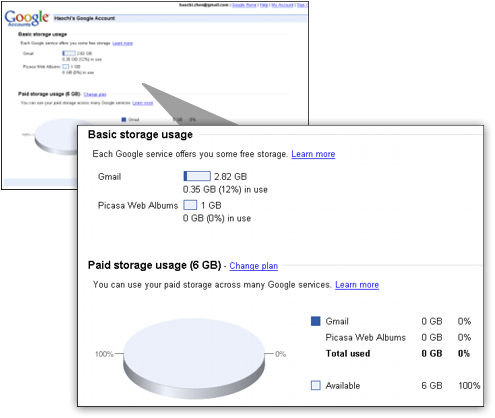
6) Google Storage 1GB - Just this month, Google has decided to make its own online storage available to its users who have a Google Account. The layout isn�t fantastic - in fact, it isn�t really a website. I�d say it�s more of a Google feature which has been pushed into the corner of the search giant�s empire. Plus, it only offers 1GB, so you don�t get a ton of space. I suppose the best part about this solution is that you have virtually no chance that your files will just disappear from the internet, and they are considered being very safe, given they are being held by one of the world�s biggest companies. It�s probably the reliability which makes this a decent choice.

Of course, all of these websites offer paid packages which seem to be quite reasonable, and many offer unlimited storage for just $5 a month. Google offers additional storage for $0.25 per GB per year, which is also quite reasonable, and you�ll have the security of being with a big name. Perhaps one of the biggest problems in the online storage market is that there have been a number of cases over the years where a company has started to take a considerable market share of those requiring online backup storage, and then that company closes down. This has resulted in people having to find another source, or in some of the smaller cases, loosing their online files entirely. It�s simply down to which sort of name you work with. For quite obvious reasons, I couldn�t see Microsoft or Google�s online presence going into a void any time soon.

Which free online storage service do you use? Do you have any additions for the list? Have you had any experiences with the services listed in this post? What�s your opinion? Have you had a bad experience with a hard drive crash? Have you lost everything and wished you�d backed up? Let me know, in a comment.

Read Original Post Here

Thursday, January 28, 2010

January 28, 2010

Apple Introduces the iPad


140,000 apps in its store, it�s no perturbation that Apple seamlessly joint them with the iPad. The Facebook app, for instance, looks meet like what you see from the app outlet Facebook.

Apple also showed an ESPN snowmobile racing spirited, purchased aright off the existing app keep.

The app outlet is full onto the iPad, and developers are foretold to educate new
games specifically for the new instrumentation.

In fact, various possess already been complete. For example, GameLoft rewrote its line Nova for the iPad�s bigger block, including adding a minimap you can increase with your fingers, or turning your fingers around a door interlace to unsettled it.

140,000 apps in its store, it�s no perturbation that Apple seamlessly joint them with the iPad. The Facebook app, for instance, looks meet like what you see from the app outlet Facebook.


Apple also showed an ESPN snowmobile racing spirited, purchased aright off the existing app keep.

The app outlet is full onto the iPad, and developers are foretold to educate new games specifically for the new instrumentation.

In fact, various possess already been complete. For example, GameLoft rewrote its line Nova for the iPad�s bigger block, including adding a minimap you can increase with your fingers, or turning your fingers around a door interlace to unsettled it.

The New York Times also has a new app for the iPad. You can save articles and read them from your iPhone, resize text, and change the number of columns you see, something you can�t do with any e-book reader.
Brushes is a painting app that lets you create art using finger gestures. Art created using this app has appeared on three New Yorker covers. The iPad version has a new color palette, the same brushes from the iPhone app, a 32X zoom ability, and painting using your fingers. You can tap a replay button to watch how you painted a picture.

Electronic Arts already has 40 apps in the app store. Now it�s working on games optimized for the iPad. EA�s spokesperson claims it�s like watching an HDTV game right in front of your eyes. Tap on the car to see the interior. Swipe your finger up and down to change gears. Tap the rear-view mirror to look behind you.
MLB.com is also working on apps for the iPad. Gameday, which lets you watch baseball games graphically, shows player stat cards, video highlights as the game goes on, box scores, field dimensions, and batter/pitcher matchups. You can also watch games live from MLB.com enhanced with many of the same features.

Sunday, January 24, 2010

January 24, 2010

Check & Repair Dead Pixels in LCD Screens

Check & Repair Dead Pixels in LCD Screens

I had recently written a article on finding dead pixels on your LCD screen, and a reader questioned us if its possible to repair these dead pixels and the answer to this is that yes sometimes it is possible to repair them. On a LCD screen when you select a Screen resolution of 1280 by 800 pixels, its not just some numbers but its the numbers of pixels which would be shown on your screen. You need to think in the way 1280 small pixels are displayed aside to each other in 800 different rows. Overall there are a total of 1280�800 = 10,24,000 Pixels on your screen. Now iam sure it will be a very hard job for you to find those pixels which are gone dead. Each of these pixels are microscopic transistors which are generally not defective but because of some reasons they can go dead and its not really easy for you to fix these dead pixels normally.

Dead Pixels Finder

While you buy a New LCD screen its recommended to check out the Dead Pixels on it using the software called DPL which shows you with a small closeup photo of a dead pixel. You can click on the application while its running to change the colours of the screen and see if any pixels colour does not change, mark it as a dead one and stop poking on it trying to fix it.

Saturday, January 16, 2010

January 16, 2010

LimeWire Review & Info Guide

LimeWire Review & Info Guide 

What is Limewire?Limewire Logo

Transferring files from the Internet to computers is not new. Pictures, games or video files are mostly on the card. But why is Limewire computer software application stealing the show? Limewire is a small, but popular Windows software founded to aid businesses and home users for free. Its enviable reputation for free use in varied versions is what makes it different.

Operating systems that use it are Windows Vista, Windows Me, Windows XP, Windows NT, Windows 98, and Windows 95 and there are no mind boggling requirements. This is the first rate version to download your music and pictures. Limewire brings the music store to your laptop and desktop computer. This is the easiest way for buying files than stealing. It�s because the source code is free. It runs on open protocol that is free to the public.

LimeWire Peer 2 Peer TransferYou can�t believe it but Limewire is perfect. It has that content to allow for different file sharing. Peer to peer networks are not shut down by Limewire application. In P2P, when you are downloading, it means you are downloading directly from another computer. But how do you download and install Limewire?

It is not a must to have all the platforms to use Limewire. The free download fits any of your choice. In other words, you can set up the download on Windows 95 if that�s what you have.

Click options menu before you embark on downloading. Select �tools� and �options� from the menu bar. Click on �sharing�, left-hand column and delete all those shared extensions. Shared connections slow down the Internet. Delete them to speed up your Internet connection.


Key in the file extensions, that is not in your computer. These are real media secure files that enables you to download Limewire. Select filters, left column to check the key words. Select ignore options on suspicious files. That adult content you smile at might be junk, so don�t waste your time. Circumvent them. Go to Limewire�s main screen and select type boxes. You�ll see, �documents, �audio�, �video� and more. Type the one you want and search. If the file is not on your network, a search result brings you nothing. Meaning? No user has launched the file you are looking for. Take a breather and search later because you can only download a file if another computer is open and are sharing a file you are searching for. But a search for Limewire doesn�t have this limitation. 

How to Download LimeWire?

Visit Limewire.com which is the official website of Limewire software. Limewire offers you with 2 versions which are � Limewire Pro which costs 34.95$ & Limewire Basic which is free. The main difference between these versions is that you get fastest speed while downloading files using Pro version along with better search results, more sources searched, reliable downloads, Built-in Media Player & Multiple Operating systems support.

Once you are the official website you have the option to download the Pro or Basic version based on your requirement after which get the direct download link which is a file around 15Mb. Once you start installing the Limewire application first Java is installed which can take up some time because its downloaded from the Java website and installed. While completing the installation process you are asked to �Agree with Some Legal Stuff� which tells you that Limewire Basic/Pro is a peer-to-peer program for sharing authorized files only. Copyright Laws may forbid obtaining or distributing certain copyright content. Only once you agree to these Legal Terms you can continue using Limewire whose main Interface starts.

Can we Limit the Download Speeds?

Yes Limewire allows you to set up the download speed at while files can be downloaded to your computer. Under the Tools > Options you have a Menu named as Advanced > Transfers which allows you to select the maximum numbers of files you can download simultaneously and the option to �Limit your download bandwidth� in the form of a progress bar, just slide it based on your requirement.

This can be a good option if you want to download files without interrupting your work by setting up 25-50% of your total bandwidth speed, with the balance speed available for your browsing. These same settings are available for File Uploads which is applicable when you are sharing your files stored on your computer. You can also select the Internet Connection Speed from Dial Up or Broadband/Cable Internet Connection.

How to Search in LimeWire?

Limewire offers you with a Search Box which can help you to search files from the whole Limewire network directly or else based on certain categories like Audio, Videos, Images, Documents & Programs. Once you Enter the Search Keyword in the Search Box, limewire starts searching for files and gives you a whole list of files which are available for instant download. The Search Results also offer you the number of P2P Users who are sharing these files, which means that these people have the same files on their Shared Folders of their computer. 

Limewire Search Results P2P

Selecting & Downloading Files in LimeWire?

Once all the search results are loaded in the LimeWire Interface you can find that the file name, P2P users total, File properties etc are loaded. You can right click on any of these files and download them. In case you find some useless file on this Peer 2 Peer Network you can right click on it and �Mark as Spam�. Only problem with these searches is that by default you will find many Adult Files in the search results and a lot of Spam files. Always Click on the Size option and ignore all the small sized files because these may be Spam files which can be harmful for your PC.

Is LimeWire Legal?

Many people keep asking this question if LimeWire is Illegal or Legal to use. Lets start thinking about this in detail. First of all the software Limewire is completely Legal if its downloaded from the official website and it allows users to download and share files. Limewire is a tool which helps you to share information in the form of files with other people who are also using the same software on their computer which is Legal job. Downloading & Sharing copyright files is completely illegal and breaks all the laws because you are downloading stuff for free which you should be paying for officially but are accessing/using it for free.

Are Limewire Files Safe & Secure?

Recently there were many questions erupting about the unsafe files available on the Limewire P2P network which can be dangerous for your computer. Some of the main problems with the content in this network is that � you may be sharing some of your private or protected files on your computer by mistake which can create big problems. There may be adult content downloaded to your computer unless you configure content filters in Limewire settings. Spywares or Virus may also get downloaded to your computer while downloading other files , hence its recommended to block files with .exe, .vbs, .lnk, .bat, .sys, or .com extension under the Content Filters.

Final Talk?

Limewire software is legal but the content you download through it may be illegal. Limewire is now offering DRM-free Legal Music which can be downloaded through the music store available at store.limewire.com , the store has more than a million tracks in it with individual songs costing 0.99$ with different discounted plans for users who download many songs. The packages range like �Platinum Plan� costing 20$ every month for 75 songs download. Limewire cannot tell you which files are Legal and which are Illegal, hence its upto you to decide it. You are the user, read all the rules and proceed towards the downloads.